Creating a new course

Back to: How to create a course in CBM Learning Portal
The learning objective of this module is to understand the basics of creating a new course in the learning portal.
It takes approximately 5-8 minutes to complete this module
Step 1
Now that we have logged into the learning portal as a course creator, we can see the following page.

On the left of the interface, click on the “Courses” tab.

Step 2
Click on “Add Course”.

Once you have clicked on “Add Course”, you should see the following screen.
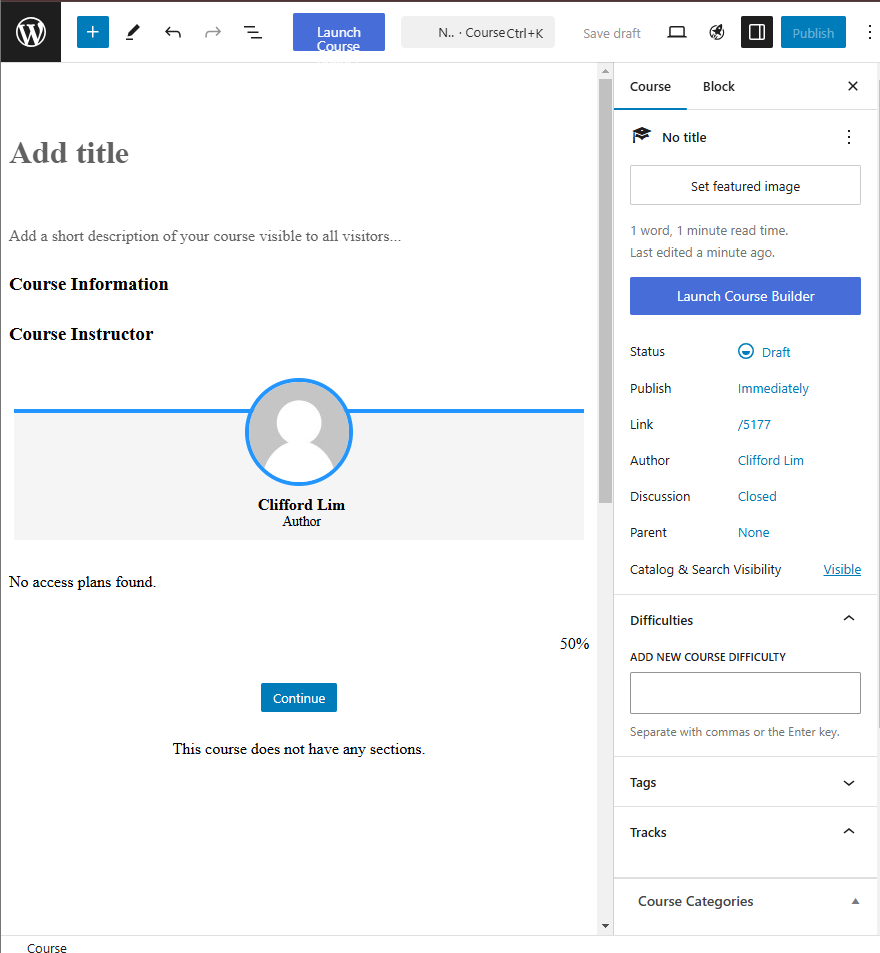
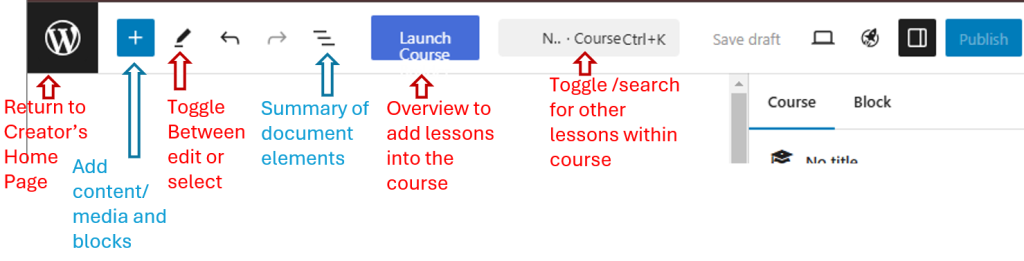
Note the functions of the interface.
Step 3
Now try adding a title and some information to your course.

Course information should contain the following :
1) Clear and precise Learning Objectives of your course.
2) The estimated amount of time required.
3) Any pre-requisite reading or knowledge required. (abbreviations, technical jargon etc)
4) Any quiz of assessment.
Step 4
You can always remove any unwanted information or elements from the course page by clicking on the 3 dots

Congratulations, you have now created a new course in the learning portal. In the next module we will create lessons inside the course, and upload PDF files into the lessons.